Teach it once.
Write your rules like you’d explain them to a friend, or start from one of 27 strategy packs.
The AI that checks your setup
Hold ⌃⌥ and ask, “Is my setup here?” Wicky reads your chart on any platform, checks it against your own rules out loud, and says “not yet” until it’s really there.
For Mac · 7 days free
Wicky is for Mac. On Windows? Join the list to hear if that changes.
Wicky reads the chart on your screen, so it works with the platform you already use. Nothing to connect, no data feed.



On Apple silicon and Intel Macs.
You don’t need to become a trading psychologist. When fear says chase it, win it back or take one more, Wicky reads your own rules back to you, before you click.
7%
of prop firm traders ever got a payout.
14% passed their challenge. About half of those were ever paid.
16%
more likely to take above-average risk after a losing morning.
Even professional futures traders, with their own money on the line, tried to win it back that afternoon.
“Not yet. Price did sweep well below the Asia low… but it hasn’t closed back above it.”
“You took a loss three minutes ago, so is this your setup or the last trade talking?”
“Your rules say stop after two losses, and you’ve taken two in a row, so the day’s done.”
Wicky’s own words, from checks on real charts. Say “I took it” and “stopped out” as you trade, and it keeps count against your limits. It checks your own rules: it never tells you to buy or sell, and makes no promise about results.
Other tools give you more data, or an AI’s opinion. Wicky checks the one thing that matters: is this your setup, by your rules?
Write your rules like you’d explain them to a friend, or start from one of 27 strategy packs.
Hold two keys and talk. Let go, and it answers out loud, in a natural voice.
Your entry, stop and target, drawn by your rules.
Wicky says yes only when it sees every rule met. Otherwise it tells you what you’re still waiting for.
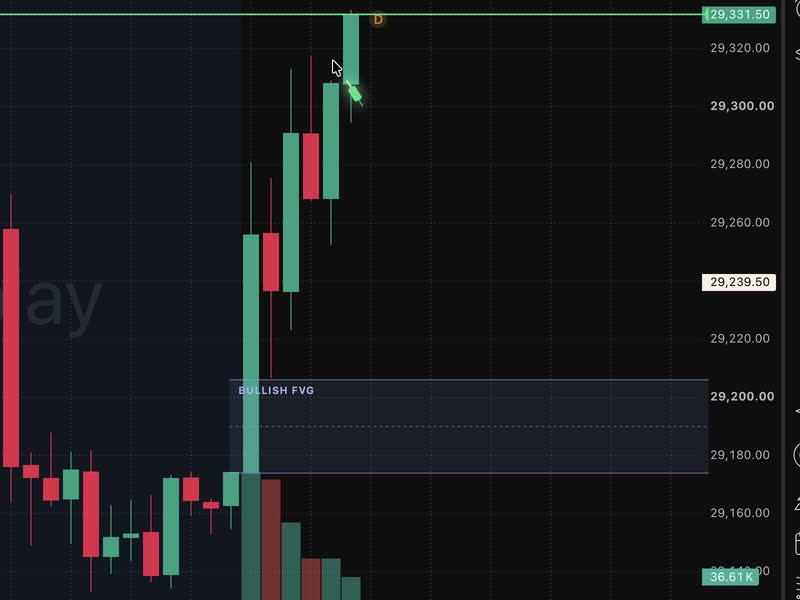
“Price is ripping. Can I jump in here, or where’s my entry?”
“Not here, that’s chasing; your entry is only a pullback into the gap. Stop goes under the sweep low, target the high.”
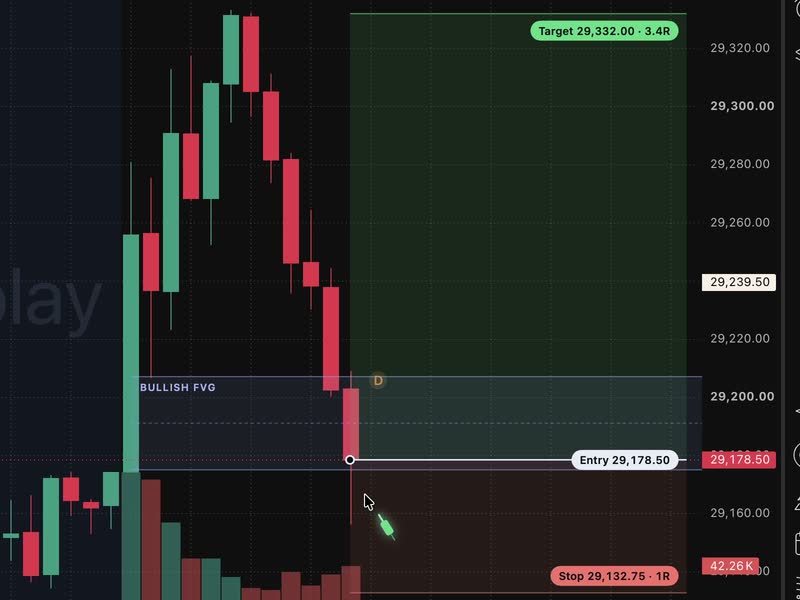
“It’s back in the gap. Is this my entry?”
“Yes, price is back inside the gap and your rules line up. Stop goes under the sweep low and target at the high of the move, which clears 2R.”
Real answers, word for word, on TradingView’s replay of 26 August 2026 (Micro Nasdaq futures, 5‑minute). Wicky checks your own rules: it never tells you to buy or sell, and never predicts price.
Locked to the candles as you scroll and zoom. Over your platform, never inside it.
Not just your setup. Ask about today’s news, your position size, or what your chart is saying.
“Any red folders today?”
Today’s news, for your market. Wicky reads the economic calendar, flashes a folder card as it names each release, and gives the time on your chart’s clock.
“Contracts for $200 risk?”
The maths, done. Position size from your risk per trade and the stop on your chart, in contracts, lots or shares.
“Is my chart bullish?”
A reading, never a forecast. What the structure, VWAP and your moving averages say right now, and why.
Switch on Auto-watch and Wicky checks your chart right after each candle closes. It stays quiet until your setup is forming or there, then taps you on the shoulder.
Popular setups written as rules Wicky can check. Pick one and edit it to fit how you trade.
Every plan checks every rule. The difference is how often you ask.
Wicky runs on Macs, with macOS 14 or later. On Windows? Join the list.
For traders who check a setup or two a day.
For day and swing traders who check in a few times a session.
For traders who want a check every couple of minutes.
Prices in US dollars; tax may be added at checkout. Cancel anytime. A check is one question or one Auto-watch look. Questions and Auto-watch looks share one monthly fair-use limit: about 230 questions or 240 looks a month on Starter (up to 8 looks a day), 600 or 1,000 on Pro, and 1,400 or 2,100 on Scalper, or a mix of the two. Auto-watch hours assume a look at every candle close at the plan’s fastest pace, and nothing else. During the free trial, the limit is 30% of that. Already a member? Download Wicky for Mac.
Each takes about a minute. Your numbers stay in your browser.
No. Wicky is for traders who place their own trades. It doesn’t scan markets, send trade calls or place trades, and it isn’t financial advice. It checks your chart against your own rules, when you ask or after each candle with Auto-watch, and tells you what’s there and what’s still missing. It never says buy or sell, and every decision stays yours.
An alert watches one thing, like price crossing a level. For that it’s instant and free, so keep using it. A chatbot gives you its own read of the market, and you explain your rules every time. Wicky already knows your rules and checks your whole setup: whether the sweep was clean, whether it’s your session, whether there’s room to your target. It answers out loud in seconds and draws your entry, stop and target on the chart.
It shows you. Wicky draws every level it reads right on your chart and says what it saw, so you can check each one at a glance before you act.
It’s tested on TradingView (in a browser or its Mac app), cTrader and MetaTrader 5, and it reads your screen, so it works with any chart and any account. It runs on any Mac with macOS 14 or later, Apple silicon or Intel. On Windows? Join the list and tick “I’m on Windows”.
Wicky reads your screen and talks to you. It never connects to your broker or your prop firm, and never places a trade. Firms set their own rules on tools like this, so check yours first. Planning a challenge? Try the free challenge planner.
Your plan works on one Mac at a time. To use Wicky on another Mac, sign in there with Whop and your plan moves to it.
No. It sends your chart only when you ask, or when Auto-watch looks, and only the screen or window you choose. While its drawings are on your chart, it keeps reading the chart’s price and time labels on your Mac so they stay in place (nothing is sent), which is why macOS shows its screen recording icon then. That’s also why macOS asks for screen recording (and, on macOS 15 and later, asks again each month): it’s macOS being careful, and safe to allow. Screenshots go securely to the AI to answer you; we don’t keep them or train AI on them. Auto-watch keeps going while you use other apps, as long as part of the chart is in view.
No. Press ⌃⌥T and type, or let Auto-watch check each candle close. It listens and answers in your Mac’s language, or one you pick: more than 30, including Spanish, French, German, Japanese, Korean and Chinese.
Yes. Add each setup with when you trade it, and Wicky checks the one that fits the chart in front of it. Multi-timeframe rules work too: keep the one-hour chart beside the five-minute, or ask on each in turn.
Yes. Every plan is free for 7 days, with every feature; cancel before day 7 and you’re never charged. To see it work before you sign up, watch the real recording at the top of this page, or check your own rules free at askwicky.com/try. Everything’s included: no AI subscription or API key.
Wicky tells you, and when they’ll be back. Daily checks start again at midnight UTC (Wicky shows you when that is in your time), and the monthly fair-use limit starts again with your billing month. You can move to a bigger plan at any time.
Hold two keys, ask out loud, and hear what your rules say before you click.
For Mac · 7 days free
Each friend who joins with your link moves you up 10 spots for Windows.
Share on XOne email when Wicky comes to your computer, nothing else.